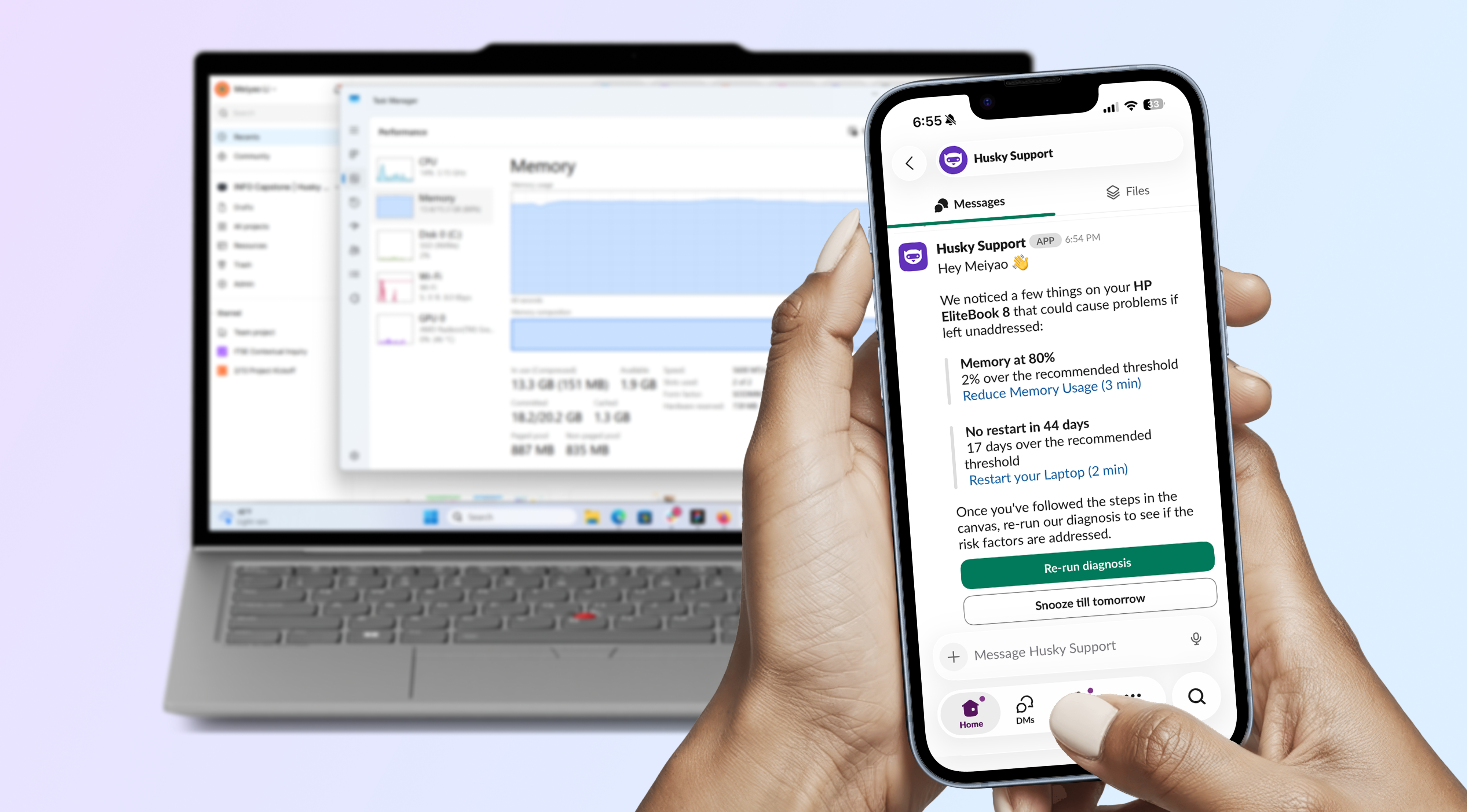
Proactive Support with Telemetry-Driven Slackbot
Intelligent device health alerts that provide just-in-time IT support.
The Language Gap
Non-technical employees don’t know what telemetry metrics are. RAM, CPU, memory pressure, thermal throttling — it means nothing to them without a clear outcome.
The Mental Model
Laptop troubleshooting feels like second nature to IT — open Task Manager, kill some processes, done. But when we empathize with our customers, the analogy is cars: when a car feels weird, you say “it feels jerky” or “it’s a little wobbly.” The language is non-descriptive, not helpful for a mechanic to diagnose the issue.
And since repair shops are inaccessible, the first instinct is to figure it out alone. The real problem: you don’t know if you’re wasting hours fixing something you can’t solve by yourself — in which case you should just schedule an appointment with the experts. And explaining what you’ve already tried can be painful and frustrating.
How might we predict self-serviceable issues and guide employees to fix them so that they can get back to work?
At Scale
Amazon IT collects 370 million telemetry records from enterprise laptops — CPU, RAM, uptime, crash logs — yet this data lived exclusively in Grafana dashboards that neither end users nor IT Support Engineers (ITSEs) could access at the point of need.
~25% of tickets are predictable and self-serviceable. With 1,000 ITSEs, that’s an estimated 750 FTE hours/week reclaimed for complex, high-judgment work.
Phase 1: IT Support Engineer Interviews
We started by interviewing IT Support Engineers because they’re the subject matter experts and handle hundreds of tickets per week.
Goal #1
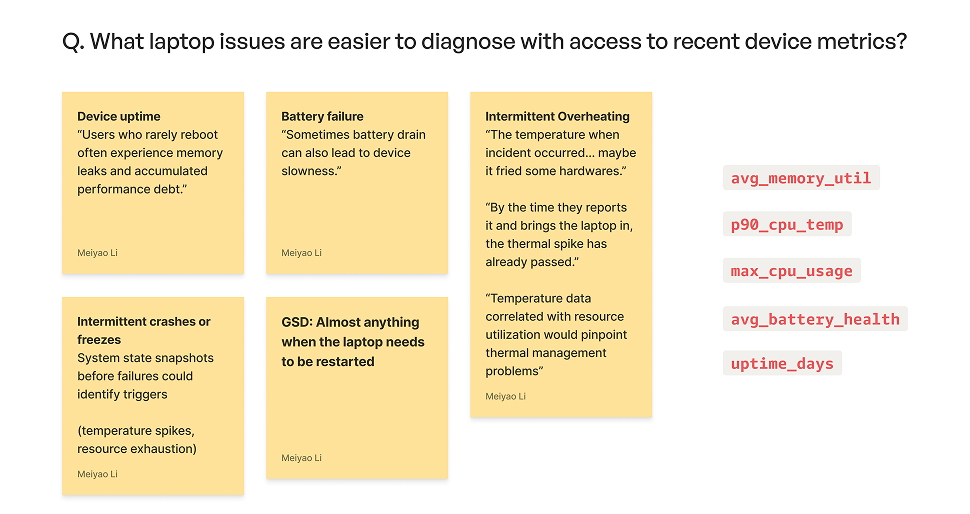
Map telemetry data to laptop issues and resolution steps.
Goal #1
Observe how customers describe their issues and provide context.
Goal #3
Explore opportunities to reduce contact handling time with telemetry data.
Research Methodology
Surveyed 6 In-Person ITSEs and 6 Online ITSEs (GSD), then interviewed 2 from each group.
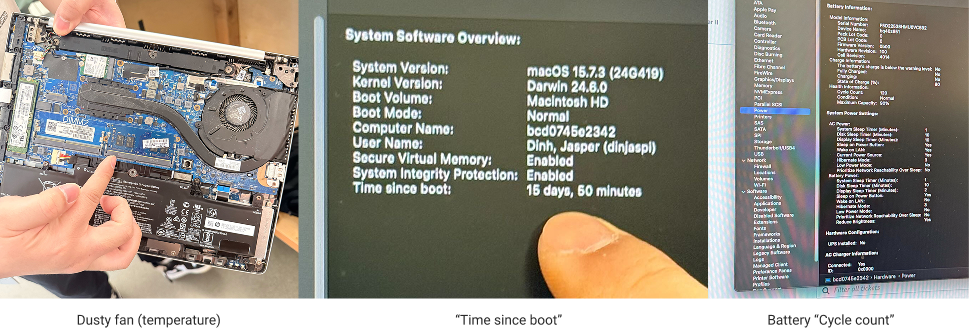
We also shadowed IT Support Engineers at Amelia & Doppler to build tangible understanding of the data: observing dusty fans (temperature), device metrics like “time since boot” and battery cycle count, and the constraints that arise when a customer’s laptop has already crashed.
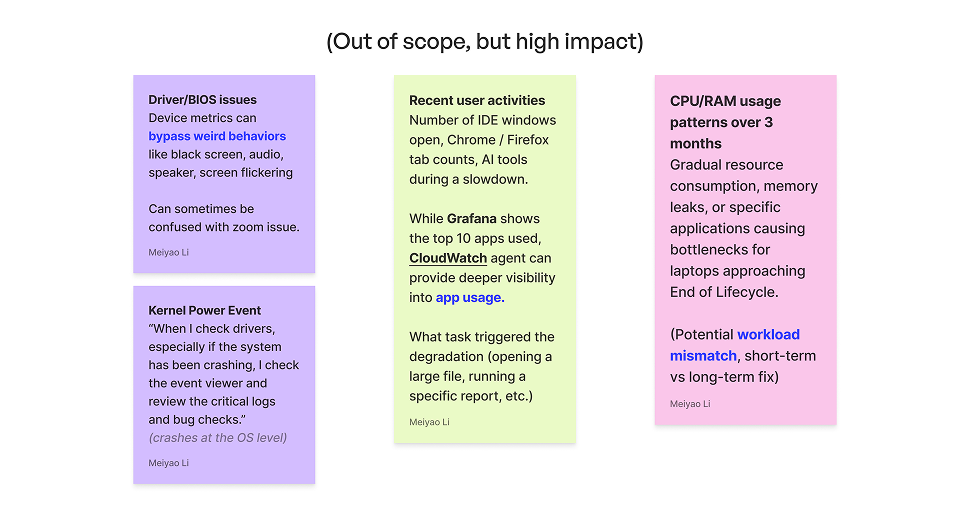
Out of Scope (High Impact Future Work)
BIOS/driver issues
requires Kernel Power events and crash dumps at the OS level
App-level actions
requires app usage data and tab counts
Usage trends over months
requires time-seried data
Phase 1 Insights
1. Quantifying the Self-Service Opportunity
~25% of issues are predictable and self-serviceable. At scale (1,000 ITSEs), that’s 15,000 hours/week — equivalent to 750 FTE hours reclaimed for complex, high-judgment work.
“A good 25% of [computer issues] could be solved by a user… out of a 40 hour work week, I would say a good 15 hours.”
2. Closing the Documentation Gap with Plain Language
The gap isn’t knowledge — it’s translation. Our model converts raw telemetry signals into plain-language diagnoses, delivered via Slack DM.
“Probably like 40% of those [are self-serviceable]. If there was proper documentation that users could easily understand… they could try those steps on their own first.”
3. The Access Paradox: Inaccessible Support Articles
IT portal articles require AEA authentication. When a user’s laptop won’t boot, the very articles that would solve their problem are locked behind the system that’s failing. Slack is accessible from any phone, any device — when your laptop is down, you can still access IT through your phone.
“33% to 50% of the articles that we have online, the customer can’t access because they need the access to the very thing that will solve their problem.”
Phase 2: End-User Interviews + Usability Testing
Interview and test Slackbot prototype with non-technical end users to validate their needs.
Recruiting
We recruited end users through the SIM ticket database who visited IT support desks for laptop performance issues and had self-service attempts. Key recruiting criteria:
- Their first instinct was to self-resolve, driven by the fact that the issue was actively blocking their work
- Although they ended up at the IT support desk, they have a bias toward independence due to their self-service attempts
- They value clarity on whether a fix is in their control
Key Personas
We consolidated our research findings into two user personas. Their shared goal: stay productive — the quickest fixes that require the least disruption to their established workspace. If they seek expert help, they want to be self-sufficient and prevent issues from recurring.
The Overwhelmed Multitasker
Non-technical PM · 6 years at Amazon · Windows 32GB
Days packed with docs, meetings, and Slack. Describes issues in feelings, not technical language. Contacts IT only as last resort after trying to fix problems alone. Wants to understand the why behind every issue to prevent recurrence.
Pain points: Browser crashes daily, laptop crashes weekly. Struggles to describe what’s wrong. Wastes time on non-self-serviceable issues.
“I always try to learn the why behind this issue when I’m talking to IT, so next time I can be independent.”
The Autonomy-Driven Remote Worker
UX Designer · 6 months at Amazon · MacBook M3 36GB
Fully remote, technically adjacent — comfortable with Task Manager but doesn’t understand Amazon IT processes. First instinct is due diligence: follow steps, understand root cause, only then approach IT. Trusts IT-curated content over anything found independently.
Pain points: IT process ignorance creates decision paralysis. Accountability anxiety on company property. No mental model for device lifecycle or replacement eligibility.
“I feel way more in control knowing that I’ve done my due diligence rather than just handing it to the IT people.”
Phase 2 UX Implications
1. Slack-native, not browser dependent
“I prefer Slack… for the two reasons: history and being able to be on my phone.”
2. Time-to-resolve as the primary decision metric
When presented with multiple issues, users chose the 5-minute fix over others — prioritizing by effort, not severity.
3. Static Canvas over conversational thread
“You are gatekeeping information” (on thread-based step reveal) vs. “Canvas is like showing everything, and I feel like I have the full autonomy to explore and figure out what is right for me.”
4. Threshold transparency as a trust-building mechanism
Users want to correlate what the bot tells them with what they see in Task Manager. This is how the bot earns long-term trust and reduces repeat interactions.
“If I know that the threshold is 70 here and I go to the task manager and I see the number go from 85 to 70, I don’t even need to come back here at all.”
5. A note on proactiveness
Outcome-driven customers won’t trust or act on alerts until the issue is visibly blocking their work. We can’t be too proactive — if their laptop is fine and they’re busy working, they won’t trust preemptive alerts.
Husky Support
A proactive, telemetry-driven Slack chatbot that delivers non-technical hardware alerts directly to Amazonians via DM.
How it works:
- A predictive ML model trained on telemetry data identifies data-driven failure thresholds
- When a device exceeds a threshold, an anomaly detection function evaluates the risk
- The Slack bot sends a personalized DM listing flagged risk factors with plain-language explanations
- Users access resolution guides, confirm fixes, re-run diagnosis, snooze, or opt out — all without leaving Slack or contacting IT
Why our approach is more intelligent than static monitoring:
| Husky Support (Predictive) | Static Threshold Monitoring | |
|---|---|---|
| Method | ML model predicts against app crash correlation | Fixed rules triggered by point-in-time snapshots |
| Data | 5-minute aggregated intervals — smooths out noise | Individual local device collection — catches momentary CPU spikes as false positives |
| Adaptability | Learns from crash patterns over time; thresholds are dynamic | Arbitrary thresholds set manually; static until human updates |
| Accuracy | Outliers filtered by design; sustained risk patterns only | Prone to false positives from transient spikes |
Core Flows
Flow A: Self-Serviceable Issue (e.g., memory pressure)
- User receives Slack DM with flagged risk factors
- Taps through to a step-by-step resolution guide showing current value vs. recommended threshold
- Completes fix → re-runs diagnosis to confirm resolution
- Bot confirms: metrics back within range ✓
Flow B: Non-Self-Serviceable Issue (e.g., battery degradation)
- Bot identifies hardware failure indicators
- Message clearly communicates: “This requires in-person IT support”
- Provides escalation path + option to schedule appointment
- User can show chat history to ITSE to skip re-explaining context
Flow C: Multiple Issues
- Message surfaces all flagged features simultaneously
- Each links to its own resolution guide
- Users prioritize by time-to-resolve (validated through research as primary decision metric)
- Snooze/dismiss options respect severity — high-risk alerts cannot be permanently dismissed
Form Factor Evolution
Iteration 1: Kiosk concept → Rejected
- Privacy concerns in public spaces
- Physical accessibility issues
- This was the sponsor’s initial assumption — our investigation found it inaccessible
Iteration 2: Reactive chatbot on IT Portal → Pivoted
- Requires laptop access (contradicts the failure scenario)
- Multi-step navigation is costly when system is slow/frozen
- Users must remember to seek help proactively
Iteration 3: Proactive Slack DM (Final) → Validated
- Accessible from any device (phone persists when laptop fails)
- Lives where users already work
- Supports restart scenario: instructions survive reboot on secondary device
- Same experience on mobile and desktop
“I prefer Slack… for the two reasons: history and being able to be on my phone.” — P2-M
Messaging & Copy Iterations
Before: Raw metrics only (e.g., “Memory: 80%”)
After: Outcome + urgency + action (e.g., “Your device could slow down or crash soon. Close unused apps to reduce memory pressure.”)
Key copy principles validated through testing:
- Pair metrics with plain-language impact (what could happen, how urgent, what to do)
- Show threshold transparency: “85% current, 70% recommended”
- Replace severity tiers with binary labels: Precautionary vs. Immediate action
- Time-to-resolve estimate on every action (users prioritize by effort, not severity)
Information hierarchy (validated):
- Resolution steps first (most important)
- What’s happening second
- Why it’s happening third
“You are gatekeeping information” — P3-Cobi (on thread-based step reveal)
“Canvas is like showing everything, and I feel like I have the full autonomy to explore and figure out what is right for me.” — P3-Cobi